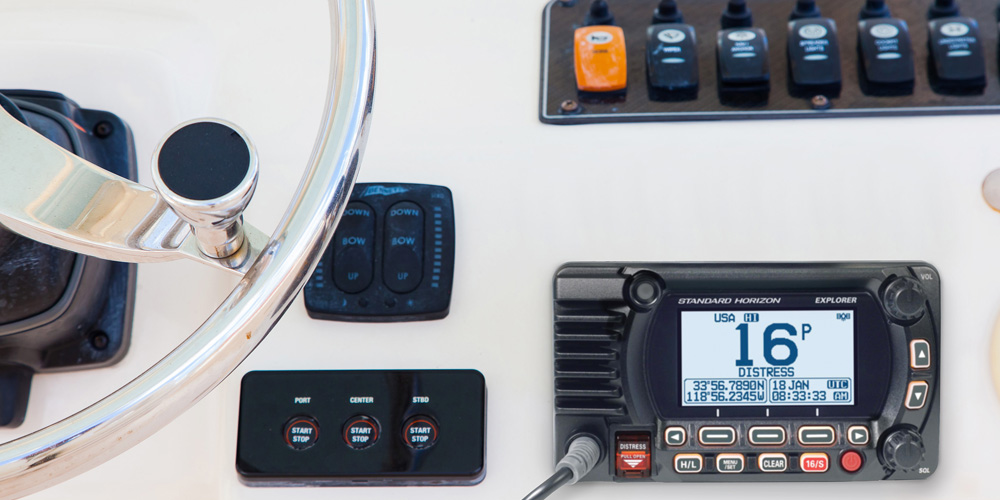
Editor’s note: While most recreational boats are equipped with DSC-capable VHF radios, not all boat owners know how to use them. With this in mind, the folks at Standard Horizon have kindly supplied us with the following article. If you count yourself among the boaters who are less than savvy on the subject of DSC, read on for an explanation of its benefits and the procedures to follow to make DSC work for you.
DSC “Digital Selective Calling” is a feature built into all Fixed Mount VHF Radios. This is a requirement for all Fixed Mount VHF’s and an optional feature for Handheld VHF radios sold in the United States. Digital Selective Calling is a feature used to initiate contact directly with another vessel using a digital signal transmitted briefly over channel 70. It is important to note that all DSC enabled VHF radios require a GPS signal to utilize the full functionality of the DSC radio. It is best to purchase a VHF with either a GPS built in, or one that can easily interface with a GPS using NMEA2000 (easy plug and play connection) or NMEA0183 (Bare wire connection).
MMSI
When any DSC radio is first turned on, an alert message shows up on the display notifying the user that an MMSI must be entered into the radio to use the DSC functions of the radio. If no MMSI is entered the radio functions can still be used, but the prompt will show up every time the radio is turned on (this can be very annoying). MMSI numbers are issued by Boat US, or the US Power Squadron. If your vessel requires a ship station license or you will be traveling internationally you should register with the Federal Communications Commission (FCC). Additional information about MMSI’s can be found on the USCG website. Here are some helpful links:
https://www.boatus.com/products-and-services/membership/mmsi
https://www.usps.org/php/mmsi_new/index.php
https://www.navcen.uscg.gov/?pageName=mtmmsi

DSC Call Types
Once an MMSI has been programmed into the radio the DSC functions will be enabled. There are different types of DSC calls that can be made:
- DSC Individual Calls
- DSC Group Calls
- DSC All ships Call
- DSC Distress Call
There are also multiple DSC position sharing calls which can be made:
- DSC Position Send
- DSC Position Request
- DSC Auto Polling
DSC Individual Calls
The most common calling feature is the DSC individual call which enables you to make direct contact with another vessel. Before making a DSC individual call, you must first know the MMSI of the person you are going to contact. Once you have their MMSI, you will enter it into the individual directory on the radio. This is like adding your friend’s phone number into your phone directory.

To execute the call, you will select Individual Call from the DSC call menu, then select the individual you want to call, next select a channel you want to ring them on, then select Call. Now the person you are calling will have the option to accept or decline the call. If they accept, you are now both on the same VHF channel and can begin communication.

DSC Group Calls
Let’s say you’re in a yacht club, and you want to rendezvous with your fellow members for lunch. DSC Group calling is the perfect solution to make this happen. A common group name and number can be setup in everyone’s radio in the group. Group numbers will always start with a 0 then 8 more numbers. Any number can be used for the group (ex. 012345678) (note this is not a number that is assigned to you, but one your group decides on their own) Once everyone has entered the Group name and group number a group call can be made. This is done by selecting group call from the DSC call menu, then select the group you want to call. Once the call has been made every individual in the group will be prompted to switch to a predetermined channel chosen by the caller. Now everyone in the group will be on the same channel and a group conversation can begin.

DSC All Ships Calls
An all-ships call is like making an individual call or group call but sometimes you want to notify all boats within your VHF range. Say you spot a big log right at the mouth of the harbor entrance, this may not warrant a distress call because immediate life or properly is not currently at stake. However, in this situation it could lead to a distress if left ignored. This type of call is useful when making a safety call or urgency call (similar to a PAN PAN call or Securite Securite call). Select DSC call from the menu, then select all ships call, most radios will now offer a sub category depending on the situation (Safety, Urgency, ETC) Once the call is activated all vessels in the VHF range will receive the call and their radio will switch to the channel selected by the caller. At this point verbal communication begins with all vessels listening on, potentially averting a much more serious situation.

DSC Distress Call
A DSC Distress call is by far the most important type of DSC call. If a vessel is in a distress situation lift the red spring-loaded Distress cover, then press and hold the red distress button for 3 seconds. At this point the radio will transmit an all-ships DSC distress call. The calling radio will now switch to channel 16 and any vessel that is within your range will automatically switch to 16, the receiving radios will also sound a distress alarm to alert the boater. If your radio is connected to a GPS (now a requirement) then your DSC distress call will also send position data to all vessels within your VHF Range, this also includes the US Coast Guard. When the US Coast Guard receives a distress call they will immediately begin communicating on channel 16 about the nature of the distress. In addition, the Coast Guard system will also link back to the database you signed up when you received your MMSI. Now the coast guard unit has additional information about your vessel, as well as your contact information, which is valuable information to conduct a successful rescue.

DSC Position Report
Say you’re having a great day fishing and you want to share your location with a buddy, but you don’t want others listening in to know about your secret spot. DSC position report is the answer. Like all other DSC calls, first select Position Report, then select the individual in your directory you want to receive it, then send. It’s as simple as that, now your buddy has your position information on the display of his radio. If his radio is tied into his GPS system, you will automatically show up as a waypoint on their display. With a simple click of the go-to button he’s on his way.

DSC Position Request
There are several scenarios that could warrant a position request. For example, your kids are out on the dinghy, and you want to check up on their location for peace of mind. Simply select position request from the main radio, then select their radio on the dinghy. If setup properly their radio will automatically reply with their position, and if the main radio is connected to the charplotter, you can ping them as often as you like to keep tabs on their location.

DSC Auto Polling
To take the DSC position request feature to the next level, you can also setup the main radio to do Auto Position Polling. This will perform the same task as an individual position request, but you can setup pre-determined intervals to ping the vessel you would like to track. You also have the capability of tracking additional vessels by adding more individuals to your auto polling setup. This would be a great way for a kayak rental company to keep tabs on multiple kayak rentals at the same time.

Conclusion
As you can see, DSC Calling is an invaluable tool in the world of Marine VHF communications. It is extremely important to correctly setup your Marine VHF by registering for and programming in the MMSI, and setting it up to show GPS information on the display by using either the internal GPS supplied in some models or by connecting to an external GPS using NMEA2000 or NMEA0183. Not only will this give you extra peace of mind out on the water, it will also make that time spent on the water as enjoyable as possible.
Browse All Marine Electronics & Navigation Gear
- Chartplotters, GPS units, radar systems, and integrated navigation displays
- Sonar, CHIRP, downscan, and fish-finding electronics
- Marine stereos, speakers, amplifiers, and audio accessories
- VHF radios, AIS, satellite communication equipment
- Autopilot systems and steering control components
- Wind, depth, speed, and multifunction instruments
- Marine binoculars for navigation and low-light use
- Thermal and night-vision devices for situational awareness
- Onboard monitoring and security systems
- Magnetic and electronic compasses
- Paper and electronic navigation charts
- Regional cruising and harbor guides
- Traditional navigation plotting tools