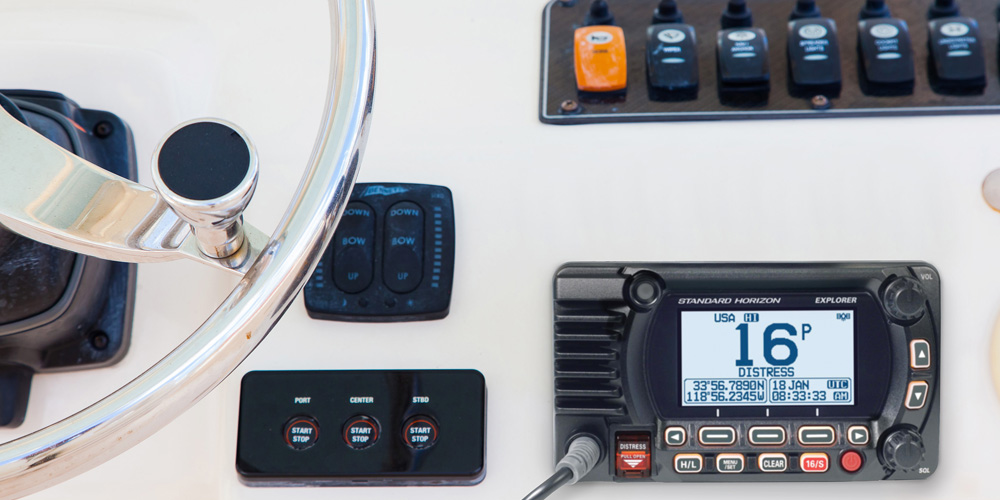
Editor’s note: While most recreational boats are equipped with DSC-capable VHF radios, not all boat owners know how to use them. Standard Horizon has supplied the following article explaining DSC benefits and procedures.
DSC (Digital Selective Calling) is a feature built into all fixed-mount VHF radios. It is required on all fixed-mount VHFs and optional on handheld VHF radios sold in the United States. DSC initiates contact directly with another vessel using a brief digital signal transmitted on channel 70. All DSC-enabled VHF radios require a GPS signal to use the full functionality of the DSC system. Purchase a VHF with either a built-in GPS or one that interfaces with an external GPS via NMEA 2000 (plug-and-play) or NMEA 0183 (bare wire).
- MMSI
- DSC Individual Calls
- DSC Group Calls
- DSC All Ships Calls
- DSC Distress Call
- DSC Position Report
- DSC Position Request
- DSC Auto Polling
- FAQs
MMSI
When a DSC radio is first turned on, an alert message appears prompting the user to enter an MMSI (Maritime Mobile Service Identity) number. Without an MMSI the radio still operates, but the DSC functions are disabled and the prompt appears every startup. MMSI numbers are issued by BoatUS or the US Power Squadron. If your vessel requires a ship station license or you will be traveling internationally, register with the FCC. Helpful links:
- BoatUS MMSI Registration
- US Power Squadron MMSI Registration
- USCG Navigation Center — MMSI Information

DSC Call Types
Once an MMSI is programmed into the radio, DSC functions are enabled. Call types available:
- DSC Individual Calls
- DSC Group Calls
- DSC All Ships Call
- DSC Distress Call
Position sharing calls:
- DSC Position Send
- DSC Position Request
- DSC Auto Polling
DSC Individual Calls
The most common calling feature. A DSC individual call lets you make direct contact with another vessel. You must first know the other vessel’s MMSI — enter it into the individual directory on your radio, similar to adding a contact to a phone. To place the call: select Individual Call from the DSC call menu, select the individual, choose a working channel, then select Call. The receiving radio alerts the operator, who can accept or decline. If accepted, both radios switch to the selected channel and voice communication begins.


DSC Group Calls
Group calling lets multiple vessels communicate simultaneously. A common group name and number is set up in each member’s radio. Group numbers always begin with 0 followed by eight digits — for example, 012345678. This is a number your group decides on, not one assigned by an authority. To call: select Group Call from the DSC menu, select the group, and send. Every radio in the group prompts the operator to switch to the caller’s designated channel. Once everyone switches, group conversation begins.

DSC All Ships Calls
An all-ships call broadcasts to every vessel within VHF range. This is appropriate for safety and urgency calls where a hazard exists but immediate distress has not yet occurred — similar to a PAN PAN or Sécurité call. For example, spotting a large log at a harbor entrance may not warrant a Mayday but could put vessels at risk if ignored. Select DSC call from the menu, select All Ships Call, then select the appropriate subcategory (Safety, Urgency). All vessels within range receive the call and their radios switch to the caller’s channel.

DSC Distress Call
The most critical DSC function. To send a distress call: lift the red spring-loaded cover and press and hold the red Distress button for 3 seconds. The radio transmits a digital distress call on channel 70 to all vessels within range, then automatically switches to channel 16. Receiving radios sound a distress alarm and switch to channel 16. If the radio is connected to a GPS, the distress call includes your position — transmitted to all vessels in range and to the US Coast Guard.
When the Coast Guard receives a DSC distress call, they immediately begin communicating on channel 16. The Coast Guard system also links to the MMSI database, giving responders your vessel name, description, and contact information — critical information for conducting a successful rescue. This is why registering your MMSI with complete vessel information is essential, not optional.

DSC Position Report
DSC position report lets you share your location privately with a specific vessel. Select Position Report from the DSC menu, select the individual in your directory, then send. The recipient’s radio displays your position. If their radio is connected to a GPS or chartplotter, your position automatically appears as a waypoint and they can navigate directly to you.

DSC Position Request
Position request asks another vessel to send their position to you. Select Position Request from the DSC menu and select the individual. If their radio is configured to respond automatically, it replies with their position. If the receiving radio is connected to a chartplotter, the position appears as a waypoint. Useful for monitoring family members on a dinghy or checking the location of a vessel you’re meeting.

DSC Auto Polling
Auto polling takes position requests a step further by automatically pinging one or more vessels at set intervals. Configure the radios you want to track, set the polling interval, and the system updates positions continuously without manual input. Multiple vessels can be tracked simultaneously. Useful for boat clubs, rental fleets, or any situation where you want ongoing awareness of another vessel’s position.

Frequently Asked Questions
Do I need to register my MMSI and why does it matter?
Yes — registering your MMSI with complete vessel information is essential for the DSC distress system to function as intended. When the Coast Guard receives a DSC distress call, they query the MMSI database to get your vessel name, type, size, color, and your contact information. This allows them to respond faster and more effectively. An unregistered MMSI means a responding rescue unit arrives knowing only a position — not what they’re looking for. Registration is free through BoatUS, the US Power Squadron, or the FCC (required if you travel internationally or your vessel requires a ship station license).
What is the difference between a DSC distress call and a voice Mayday on channel 16?
A DSC distress call is a digital signal that automatically transmits your vessel’s MMSI, position (if GPS-connected), and distress nature to all vessels in range and the Coast Guard — in the time it takes to hold a button for 3 seconds. It requires no voice communication to transmit critical information. A voice Mayday on channel 16 requires you to verbally communicate all of that information, which is harder under stress and depends on someone monitoring channel 16 at that moment. Best practice is to send the DSC distress call first to alert vessels and the Coast Guard, then switch to channel 16 to give the verbal Mayday and respond to replies.
What happens if my VHF radio is not connected to a GPS?
A DSC distress call sent without GPS will still alert all vessels in range and the Coast Guard — but it will not include your position. The Coast Guard will still respond on channel 16, but they will have to determine your location by radio direction finding or by questioning you directly, which takes significantly more time. Connecting your VHF to a GPS (either internal GPS or external via NMEA 2000 or NMEA 0183) is one of the most important safety upgrades you can make to any vessel.
How do I initiate a DSC distress call correctly?
Lift the red spring-loaded cover on the Distress button and press and hold the button for 3 seconds. The radio will count down and then transmit the distress call digitally on channel 70, then automatically switch to channel 16. Do not release the button early or the transmission will not complete. After transmitting, remain on channel 16 and listen for a Coast Guard or vessel response. Give a voice Mayday with your position, vessel description, nature of distress, number of persons aboard, and any other relevant information.
Browse All Marine Electronics & Navigation Gear
- Chartplotters, GPS units, radar systems, and integrated navigation displays
- Sonar, CHIRP, downscan, and fish-finding electronics
- Marine stereos, speakers, amplifiers, and audio accessories
- VHF radios, AIS, satellite communication equipment
- Autopilot systems and steering control components
- Wind, depth, speed, and multifunction instruments
- Marine binoculars for navigation and low-light use
- Thermal and night-vision devices for situational awareness
- Onboard monitoring and security systems
- Magnetic and electronic compasses
- Paper and electronic navigation charts
- Regional cruising and harbor guides
- Traditional navigation plotting tools