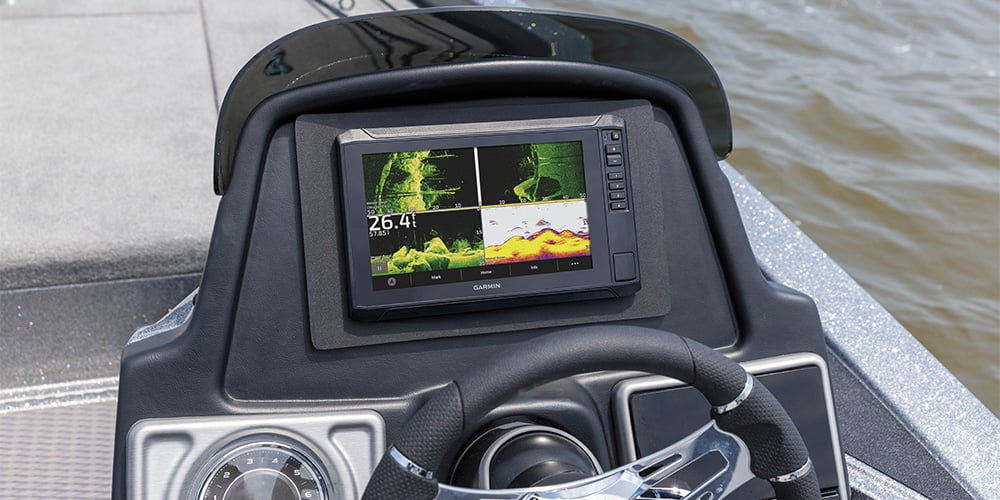
When it comes to fishfinding sonar, recent years have brought remarkable advances in the clarity, performance and sophistication of the technology available to the average angler. But great technology is only useful if you have a basic understanding of what it’s showing you on the screen — and how to interpret that information to help you find and catch more fish.
In this article, we’ll look at two important advances offered in today’s newer fishfinders — down-scan and side-scan sonar. We’ll try to clarify what each of these sonar types does best so you can get the most from your device and correctly interpret what you’re seeing.
How Scanning Sonar Works
Unlike traditional 2D sonar that produces a broad, cylindrical cone-shaped transmission that widens as it travels down through the water column, both down- and side-view scanning sonars use a thin fan-shaped slice of high-frequency energy to concentrate more power on targets and produce an ultra-clear “snapshot” of the area below your boat.
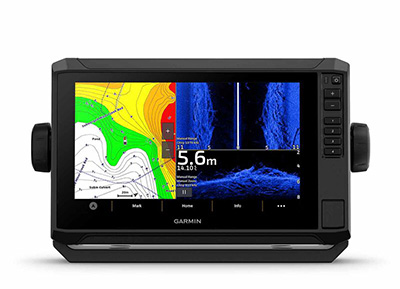
Garmin's ECHOMAP™ UHD2 series allows you to have down-view, side-view and charts on the screen at the same time to make it easier to find your catch.
Transmitting at multiple frequencies, scanning sonar’s thinly sliced beam enables it to show a much higher level of detail and target separation than the more broadly dispersed cone of traditional sonar. These snapshot “slices” are then digitally assembled to provide a flowing historical view of below-surface objects, structure, bottom contours and fish as your boat moves across the water.
As a general rule, the higher transmitting frequencies provide the sharpest resolution at shallower depths, with a narrower area of coverage — while lower frequencies deliver deeper water penetration and good overall image quality with a somewhat larger area of coverage. These down- and side- scanning sonar technologies are available from a number of manufacturers, under proprietary brand names such as ClearVü™ and SideVü™ imaging from Garmin or other makers’ versions, which include DownVision/SideVision™, SideScan/DownScan™ and so on. Most manufacturers offer fishfinder models that let you choose either or both scanning profiles. Some units, such as the Garmin ECHOMAP™ UHD2 series, even let you access both types simultaneously in the same unit, so you have the broadest possible range of viewing options, based on how and where you’re fishing.
Down-View Vs. Side-View Sonar
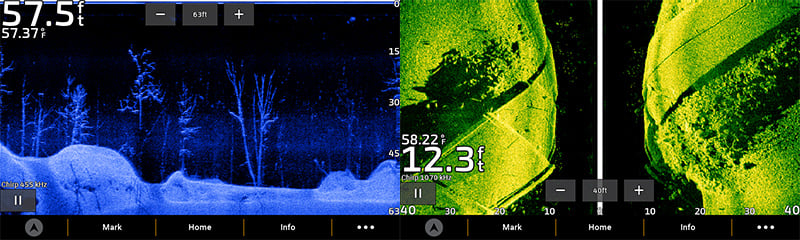
As we’ve suggested, the sonar down- and side-view scanning profiles each have their own operational advantages and limitations. Down-scanning sonar is designed to show a high level of detail in a narrow window under your boat — while side view, as the name implies, is a sonar profile covering larger areas of water to either side of your boat. Unlike traditional 2D sonar, down-scanning sonar provides photo-like images of brush piles, sunken trees, rocks and other underwater features — so you can more easily picture areas with potential fish-holding structure.
Know What You're Seeing with the Tech You're Using
Because the down-scanning sonar image is a “thin-sliced” scan, fish targets typically show up as dots on your sonar display — compared to the relatively wide fish arches on traditional 2D sonar. Because of this difference, it can sometimes be hard to distinguish individual fish targets on down-scan imaging, especially if the fish are small, or if they’re moving quickly through the narrow window of the down-scanning sonar. In that case, it may be helpful to run both 2D and down-scan sonar in tandem (if your fishfinder has this capability) to augment the down scan’s more detailed environmental imagery with the relatively larger fish arches on 2D sonar. Reading down-scanning sonar is similar to reading the traditional 2D sonar, with the view scrolling from right to left on the screen, and newer information appearing first on the right. Selectable color palettes, available on various sonar brands (including all the newest Garmin models), allow you to customize your screen view with vivid colors to match current water conditions, ambient lighting or just personal preferences — to help you identify the structure and fish below your boat.
More about Side-Scan Imaging
Sending out two broad sonar scans that extend hundreds of feet to either side of your boat, side scanning is ideal for searching large areas of water, in a short amount of time, to locate the most promising fishing spots. When you’ve found what appear to be fish-holding structures — trees, rock piles, soft bottom areas or submerged objects — you then can investigate them more closely, using the extra-sharp detailing of your down scanning sonar. The side scan is also helpful when you want to check areas that may be too shallow or unsuitable for your boat, such as rocky shores, banks or reefs.
With side-scan sonar, the dark center portion you see on the screen represents the column of water underneath your boat as your device scans out toward the sides. Picture the dark center as a waterway passing under your boat, allowing you to view fish and structure along either side of your hull. When the side-projected beam hits an object, it casts a shadow — as if it were being lit by the beam of a flashlight. This shadowing effect can be very helpful in detecting objects and fish targets suspended in the water column — and in estimating how close they are to the bottom. If you’re used to viewing traditional right-to-left scrolling sonar, reading side-scan images can require some mental reorientation because it scrolls from top to bottom on your display, and there’s a slight built-in time delay as the snapshot images are digitally compiled. Which means, if you’re moving at a good clip across the water, the images you’re picturing on sonar may already have passed behind you. With a little practice you’ll be able to gauge how your boat speed affects the timeliness of the sonar scans you’re seeing. With most manufacturers’ sonars, side-scan viewing can be customized to your tastes with various color palette choices, filtering options, zoom and other features designed to help you better interpret what you’re seeing — so, ultimately, you can improve the odds of catching more brag-worthy fish.
Browse All Marine Electronics & Navigation Gear
- Chartplotters, GPS units, radar systems, and integrated navigation displays
- Sonar, CHIRP, downscan, and fish-finding electronics
- Marine stereos, speakers, amplifiers, and audio accessories
- VHF radios, AIS, satellite communication equipment
- Autopilot systems and steering control components
- Wind, depth, speed, and multifunction instruments
- Marine binoculars for navigation and low-light use
- Thermal and night-vision devices for situational awareness
- Onboard monitoring and security systems
- Magnetic and electronic compasses
- Paper and electronic navigation charts
- Regional cruising and harbor guides
- Traditional navigation plotting tools