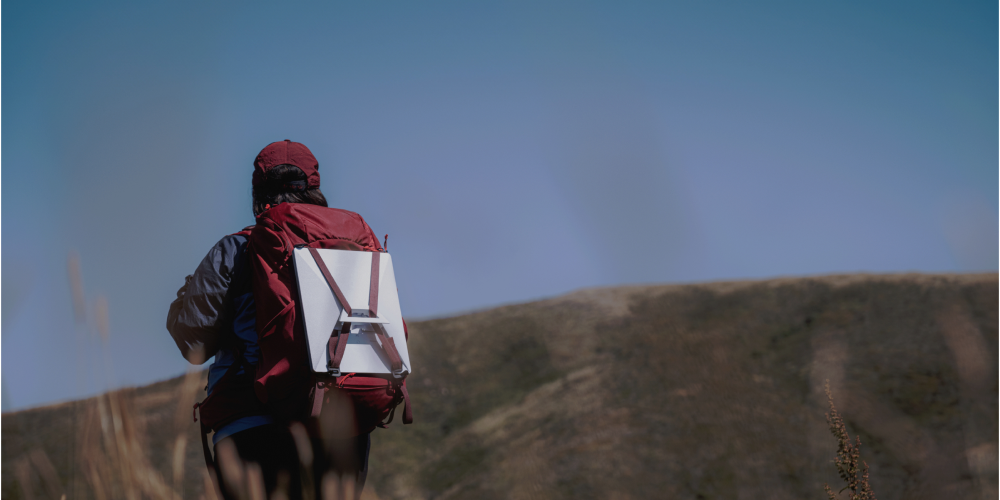
Starlink satellite internet gives campers, RVers, and overlanders something that was not possible until recently: genuinely fast, reliable internet access anywhere you have a clear view of the sky. Campground Wi-Fi is notoriously slow and unreliable. Cell hotspots work fine near cities but fail the moment you head into the backcountry. Starlink’s network of low Earth orbit satellites delivers 50–200 Mbps internet to remote campsites, national forests, and off-grid destinations where no other option exists.
This guide covers everything you need to get Starlink working at your campsite — which hardware to choose, which plan fits your use, how to set up and position the dish, what affects performance in the field, and what it actually costs.
- Why Starlink for Camping
- Which Starlink Kit Should You Get?
- Choosing the Right Plan
- Setting Up at the Campsite
- Power Requirements
- What Affects Performance
- Starlink for RVs
- Practical Tips
- FAQs
Why Starlink for Camping
Connectivity at camp matters for more than just entertainment. Real-time weather updates can be the difference between a good trip and a dangerous one. Remote workers and digital nomads need reliable internet to maintain schedules regardless of location. Families traveling with kids want to stay in touch with relatives and access streaming when the day is done. And in a genuine emergency, having communication options beyond a cell signal you cannot find is real safety value.
Starlink addresses all of these because it does not depend on cell towers. Its coverage comes from satellites overhead, meaning a remote campsite in the Sierra Nevada, a dispersed site in a national forest, or a boondocking spot in the desert can have the same quality internet as a urban apartment — as long as the dish has a clear view of the sky.
The practical advantage over campground Wi-Fi is significant. Campground Wi-Fi serves dozens or hundreds of users through a single or limited number of access points. Even when it works, streaming or video conferencing is typically impossible. Starlink gives you a private connection with bandwidth that does not depend on what other campers are doing.
Which Starlink Kit Should You Get?
West Marine carries Starlink hardware at different price points. View our current Starlink kit selection. The right choice depends on how you camp and what you need.
Starlink Mini (~$249): The most portable Starlink option. Compact enough to fit in a backpack, with the lowest power draw of any Starlink dish (20–40 watts). Delivers the same satellite network speeds as larger dishes. Best for: tent campers, backpackers with a small solar setup, overlanders with limited vehicle power, and anyone who prioritizes portability over sustained heavy use.
Starlink Standard Kit (~$350–$500): The most popular choice for RV and car campers. Larger dish footprint than the Mini, with slightly higher power draw, but the same speeds and coverage. Includes the router and all cables needed for a complete setup. Best for: RV camping, van life, car camping with a dedicated battery system, and any setup where portability is less of a constraint than sustained daily use.
You own the hardware outright — unlike many internet services where the equipment is leased, your Starlink kit is yours. This matters for camping because you can keep the kit ready with your gear even if you are not currently paying for service, then activate when you need it.
Choosing the Right Plan
Starlink’s plans have changed frequently since launch and continue to evolve. For current pricing, visit Starlink’s website directly — we cover plan costs in detail in our How Much Does Starlink Cost guide. Here is how to think about which plan fits camping use:
Roam plan (best for most campers): Designed for mobile and portable use. Works at home, at camp, in your driveway, or anywhere you have a clear sky view within Starlink’s service area. Includes in-motion capability for use while driving (though you should not be watching video while driving). Supports both inland and coastal coverage. Month-to-month with no long-term contract — you can pause or cancel any time. This is the plan most RVers and campers use.
Mini Roam: A lower-cost tier with a monthly data cap (currently 50–100GB depending on region). After the cap, speeds are reduced rather than service cut off entirely. Good for: campers who mostly need weather checks, maps, messaging, and light browsing rather than streaming or video calls.
The key practical advantage for seasonal campers is the ability to pause service during months you are not using Starlink. You keep your account and hardware, stop paying, and reactivate with a few clicks when camping season starts again. This makes Starlink cost-effective even if you only camp a few months per year.
Setting Up at the Campsite
Starlink setup at a campsite takes under 10 minutes once you have done it a few times. The most important factor is dish placement — everything else is straightforward.
- Find a clear sky view: The dish needs an unobstructed view of the sky — particularly in the direction of north (in the Northern Hemisphere). Trees, canyon walls, and large structures cause the most common performance problems. Before committing to a campsite spot, look up and identify any obstructions. The Starlink app includes an obstruction checker: point your phone at the sky and it will show you exactly which parts of the view are blocked and how much they will impact performance.
- Elevate the dish if possible: Higher placement gives the dish a wider clear-sky view. For RV campers, the roof is the ideal location. For tent campers, the top of a picnic table, the roof rack of a vehicle, or even a simple pole mount gets the dish above ground-level obstructions like brush and low branches.
- Assemble and power on: Connect the dish to the router with the included cable, plug the router into a power source, and power on. The dish will automatically align itself with the satellite constellation — this takes 2–5 minutes the first time. You do not need to manually aim the dish.
- Connect your devices: Once the dish establishes a connection, the Starlink router broadcasts a Wi-Fi network. Connect your phone, laptop, tablet, or any other device as you would to any Wi-Fi network.
Power Requirements
Power is the most important planning consideration for off-grid camping with Starlink, especially for tent campers and overlanders without a generator or shore power.
- Starlink Mini: 20–40 watts average. Running 4 hours per day draws roughly 80–160 watt-hours — manageable with a 100–200Ah battery and modest solar.
- Starlink Standard: 25–75 watts average, with higher peaks at startup and during high-demand periods. Running 4 hours per day draws 100–300 watt-hours — comfortable for most RVs with house batteries and a solar setup.
For tent campers and overlanders without a dedicated battery system, the Starlink Mini’s lower power draw is a meaningful advantage. A 100W portable solar panel charging a 100Ah lithium battery can comfortably run a Mini for several hours per day. For RVers with a proper house battery bank and roof solar, either dish works well.
Always have a backup power plan. If your campsite has limited solar generation due to tree cover (the same trees that block your dish’s sky view), plan for generator backup or limit Starlink use to essential tasks.
What Affects Performance in the Field
Starlink performance at a campsite is typically excellent when the dish has a clear sky view. Several factors can reduce it:
- Obstructions: Trees, canyon walls, mountain ridges, and structures that block the dish’s view of the sky cause the most common and most significant performance problems. Even a small obstruction in the northern sky can cause regular dropouts. Use the obstruction checker before settling on a placement.
- Weather: Heavy rain, snow, and dense cloud cover can reduce signal strength. Light rain and normal cloud cover typically have minimal effect. Starlink is designed to handle weather better than older satellite systems, but severe storms will impact performance.
- Network congestion: In popular camping areas with many Starlink users — large national park campgrounds, for example — shared satellite capacity can reduce speeds during peak evening hours. This is rarely a problem in dispersed backcountry camping where user density is low.
- Dish temperature: In extreme heat, the dish may reduce power and performance to protect itself. This is most common in desert environments in summer. Providing shade for the dish (while keeping its sky view clear) can help.
Starlink for RVs
For full-time RVers and frequent road travelers, Starlink is a game-changer. The Roam plan supports use anywhere within the continental U.S. and Canada, allowing you to use the same dish and account whether you are in your driveway or at a remote campsite in Montana.
RV-specific considerations:
- Roof mounting vs. portable: Many RVers permanently mount the dish on the roof for convenience, though this requires drilling and proper weatherproofing. Others keep the dish portable, setting it up on a tripod or table at each site. Portable setup adds 5–10 minutes to camp setup time but avoids the permanent installation. The choice depends on how frequently you move and your comfort with permanent modifications to the vehicle.
- In-motion use: The Roam plan supports in-motion use, which technically allows passengers to use the internet while the RV is moving. Performance while underway is variable and depends on speed and terrain. This is a nice feature for passengers to use but not reliable enough for video calls or work during transit.
- Cable routing: If you permanently mount the dish on the roof, plan the cable route carefully. The Starlink cable is not easily field-replaced and must be routed through the RV in a way that prevents moisture intrusion. A properly installed cable entry gland or existing cable entry point keeps the installation weathertight.
- Power integration: Most full-time RVers connect the Starlink router directly to the RV’s 12V system via a 12V-to-DC adapter, rather than using the AC power supply that comes with the kit. This avoids conversion losses and works seamlessly with the RV’s house batteries. Third-party 12V power adapters for Starlink are widely available.
Practical Tips for Camping with Starlink
- Check coverage before your trip. Starlink’s coverage map is available on their website. Most of the continental U.S. and Canada is covered, but some remote areas — deep canyons, certain remote regions — may have limited or no coverage. Check the map for your specific destination before relying on Starlink as your primary communication option.
- Use the obstruction checker at every new site. What looked clear at your last campsite may not be clear at the next one. Spend two minutes with the app before you commit to dish placement.
- Pause service between camping seasons. If you only camp seasonally, pause your subscription rather than paying through winter. You keep your account and equipment ready for next season.
- Have a backup for emergencies. Starlink is not a life-safety communication device. For genuine emergencies in remote areas, a PLB (Personal Locator Beacon) or satellite communicator like a Garmin inReach provides GPS-tracked distress signaling that works independently of Starlink’s data service.
- Protect the dish in transit. The standard dish is durable but not designed to rattle around unsecured in a truck bed. Use the original packaging or a purpose-made carry case when transporting between sites.
- Keep firmware current. Starlink pushes periodic firmware updates automatically. These improve performance and reliability over time — the product has improved significantly since launch and continues to do so.
Frequently Asked Questions
Can I use Starlink in remote national parks?
Yes, provided you have a clear view of the sky and a power source. National parks with deep canyon topography (the bottom of the Grand Canyon, for example) may have limited visibility, but most open campgrounds in national parks and forests have adequate sky view for good Starlink performance. Check the coverage map and use the obstruction checker at your specific site.
What equipment do I need?
A Starlink kit includes everything you need: the dish, router, and power supply. You add a service plan through the Starlink app. No other equipment is required for basic setup. For off-grid use you also need a power source — a battery and solar panel setup is the most common solution for campers without shore power or a generator.
Is Starlink portable between different camping locations?
Yes — the Roam plan is specifically designed for this. You can use the same dish and account at home, at a campsite, at a boondocking spot, or anywhere else within Starlink’s coverage area. Setup at a new location takes a few minutes.
How does weather affect Starlink performance?
Heavy rain, snow, and severe storms can reduce signal strength. Light rain and normal cloud cover typically have little effect. Obstructions from trees and terrain have a much larger and more consistent impact on performance than weather. Position the dish with the best possible sky view as the first priority.
What are the data limits?
It depends on the plan. The Mini Roam plan includes a monthly data cap (currently 50–100GB in most regions) after which speeds are reduced. The standard Roam plan includes unlimited data. For streaming, video calls, and heavy use, the unlimited plan is worth the additional cost. For light use — weather checks, maps, email, and occasional browsing — the capped plan is adequate. See our How Much Does Starlink Cost guide for current plan pricing.


